Showing posts with label free. Show all posts
Showing posts with label free. Show all posts
Monday, August 19, 2013
Vodafone Free TV Offer with Samsung Hero 3G Mobile
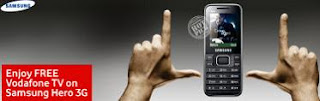
Heres a treat for all the television buffs. Watch your favourite shows on Samsung Hero E3210 or E3213 with the free subscription of non premium channels on Vodafone TV.
Just sms TV to 111 (toll free) and download the Vodafone TV launcher application and get access to the entertainment right at your finger tips. With Hero E3213 you can enjoy Video Calling. So Hurry! This offer is valid only till 31 July, 2011
Data usage charges as applicable. Premium channels’ subscription will be charged.
To know more about Vodafone TV, click here
Samsung Hero - A classic beauty, a fast socializer.
Samsungs Hero takes the classic bar mobile and updates it with modern touches, resulting in a sophisticated mobile that suits your style and your needs. Undoubtedly, this mobile is a complete all-rounder.
Features:
- Modern classic design
- HSDPA 3.6 Mbps for fast browsing
- Social Networking Services & Instant Messaging
- Multimedia Powerhouse
- Mobile Tracker
Vodafone TV:
Catch all the TV Channels LIVE along with Videos on Vodafone TV from your Vodafone mobile phone, best enjoyed with Vodafone 3G.
Features:
- Variety of Channels across genres like News, Music, Entertainment, Infotainment, Regional, Lifestyle, Fashion and more on Vodafone TV
- Fast channel switching: When playing a channel you can browse through the other available channels under the same genre by just clicking on the left and right navigation keys
- Electronic program guide: View the upcoming programs for live channels by clicking on the Program Guide option from the channels listing page.
- Search your Favourite channels for Faster navigation
- Add mostly watched channels in your Favourites Section
- Manual or Automatic Selection of the Data Network to browse (2G or 3G)
- Here are the some of channels and Videos you can enjoy with Vodafone TV.
- Times Now, NDTV, Zoom, AAJTAK, National Geographic, Discovery, SONY TV, SAB TV, STAR ONE, STAR TV, F-TV and Cartoon Network.
- To download Vodafone TV application on your Vodafone mobile phone, sms TV to 111 (toll free)
Powered by Apalya. Data charges apply.
Note: FREE subscription to Vodafone TV, non premium channels, till July 31, 2011. Offer applicable on Samsung Hero E3210 and Samsung Hero E3213, Data usage charges as applicable,Premium channels’ subcription will be charged. Terms & conditions apply.
Source: Vodafone Essar Limited

Monday, May 13, 2013
Free Download User Guide pdf Pantech Flex

The Pantech Flex is a product pantech, for those of you who need a guide you can use to directly download pantechusa.com (official website pantech) but on this site we gather from several sources about Pantech Flex smartphone specifications and free download user guide pdf Pantech Flex this site.in user guide pdf there are many different ways to use Pantech flex correctly, features, spesifications.free download user guide pdf pantech flex 4.58MB in size fail pdf format (108 pages)we provide free download user guide pdf in both English and Spanish
Specification and features
* Network: GSM; HSDPA; LTE
* Processor: Dual-core 1.5 GHz Krait
* GPU: Adreno 225
* Operating System: Android v4.0.4 (Ice Cream Sandwich)
* Keyboard/Form Factor: On screen / Bar
* Display: 4.3 inches Super AMOLED display, advanced capacitive touchscreen
* Sensors: Accelerometer, proximity, compass
* Camera: 8 MP camera with autofocus, LED flash, Geo-tagging, touch focus, HDR and panorama; Front camera: 2MP
* Vide: 1080p@30fps
* Memory: 8 GB internal memory, 1 GB RAM and up to 32 GB microSD card (8 GB included)
* Data speed: HSDPA, HSUPA, LTE
* Bluetooth: Yes, v4.0 with A2DP
* USB: Yes, microUSB v2.0
* WLAN: Wi-Fi 802.11 a/b/g/n, dual-band, DLNA, Wi-Fi hotspot
* Location: GPS / A-GPS
* 3.5mm jack: Yes
* Battery: Li-Ion 1830 mAh battery
* Dimensions: 129.8 x 67.1 x 7.9 mm
* Weight: 132 g
* Video Player: MP4/WMV/H.264/H.263 player
* Music Player: MP3/WAV/eAAC+ player
* Browser: HTML5
* Document viewer: Yes
* Google services: YouTube, Google Search, Maps, Gmail, Calendar, Google Talk
* Messaging: SMS(threaded view), MMS, Email, Push Mail, IM, RSS
Before using your Pantech Flex smartphone, you have to check the accessories supplied, such as Pantech Flex mobile phone, battery, adapter, USB cable and quick start guide.
How to reset your mobile phone?
1. Tap Application -> Settings -> Backup & reset.
2. Tap Factory data reset.
3. Tap Reset phone.
4. Tap Erase everything
How to use the Face Unlock Function?
Follow this instructions:
1. Tap Applications -> Settings -> Security -> Screen lock -> Face Unlock.
2. Tap Set it up -> Continue.
3. Align your face with the figure on the screen.
4. Tap Continuewhen your face is captured.
5. Select and tap the secondary unlock type.
6. Configure the secondary unlock settings, and then tap OK
How ro set a Speed Dial Number?
1. Tap Contacts.
2. Tap Menu -> Speed dial setting.
3. Select and tap a number, and tap Add.
4. Select and tap a contact
To know more about complete quick operating guide of Pantech Flex, please download this Pantech Flex user manual below.
Table contents of Pantech Flex user guide
- Read it first
- Getting Started
- Phone Experience
- Basic Operations
- Calling andd Messaging
- Communication
- Media Center
- Menu Function
- AT&T Services
- Settings
- Appendix
This Pantech Flex user guide is available for FREE at Pantech website, we neither affiliated with the author(s), the website and any brand(s) nor responsible for its content and change of content. (Read our disclaimer before you download the document from the website).
Download Pantech Flex user guide english.PDF (PDF file; 4.58 MB)
Download Pantech Flex user guide spanish.PDF (PDF file; 3.09 MB)
Subscribe to:
Posts (Atom)