Showing posts with label exilim. Show all posts
Showing posts with label exilim. Show all posts
Saturday, August 31, 2013
Casio EXILIM EX H50 Manual User Guide
Casio EXILIM EX-H50 Digital Camera Users Manual (Owners Instruction) - The EX-H50 comes with Silent Mode, which instantly changes the cameras settings to avoid disturbing others nearby. This includes silencing all sounds, disabling the flash, and deactivating the self-timer and AF Assist Lamp. Silent Mode is especially helpful when taking pictures in places like museums, aquariums, and restaurants. The ART Shot function offers a choice of eight artistic effects that alter the stylistic impression of your photos. You can create unique expressions easily without processing the images on a PC. You can Free Download Casio EXILIM EX-H50 Operating Instruction Guide / Owners Manual / Users Manual (PDF format) below.
 |
| Google Images |
The Tracking AF function locks onto a moving subject and adjusts focus as required. Even if the subject exits the frame, Tracking AF remembers the subject and picks it up again automatically when it re-enters. Focus is continually updated until the shutter button is pressed.
Key Features of Casio EXILIM EX-H50:
- 16.1 megapixels CCD sensor
- 24x (25-600mm) wide-angle optical zoom lens
- CCD Shift Stabilization
- Tracking AF
- 2cm Macro
- 3.0-inch TFT color display
- HD Movie Recording
- Premium AUTO
- Self-portrait
- 8 ART Shot scenes
- Silent Mode
- 19 BEST SHOT scenes
- Make-up Mode function
- USB Charging
- Eye-Fi Card compatible
Download Casio EXILIM EX-H50 Manual User Guide :
- Casio EXILIM EX-H50 User Manual - English
- Casio EXILIM EX-H50 German User Manual - Deutsch
- Casio EXILIM EX-H50 French User Manual - Français
- Casio EXILIM EX-H50 Italian User Manual - Italiano
- Casio EXILIM EX-H50 Spanish User Manual - Español
- Casio EXILIM EX-H50 Portuguese User Manual - Português
- Casio EXILIM EX-H50 Dutch User Manual - Nederlands
- Casio EXILIM EX-H50 Russian User Manual - Русский
- Casio EXILIM EX-H50 Japanese User Manual - 日本語取扱説明書

Sunday, May 5, 2013
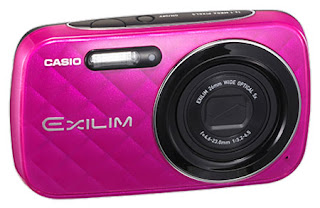
Casio EXILIM EX N10 User Manual Guide
Casio EXILIM EX-N10 Digital Camera Users Manual (Owners Instruction) - EXILIM EX-N10 features Premium AUTO mode which automatically analyzes the scene and applies best settings and image processes.The result is perfect photos every time. You can Free Download Casio EXILIM EX-N10 Digital Compact Camera Operating Instruction Guide / Owners Manual / Users Manual (PDF Format) below.
EX-N10 is equipped with the useful Make-up Mode function for beautiful portrait photos. The outstanding image processing makes the skin on faces appear smoother and softens facial shadows caused by strong sunlight or illumination.
 |
| Google Images |
The Anti Shake Mode combined higher sensitivity and faster shutter speeds reduce the chance of image blur due to hand and subject movement, making it possible to capture clear images without using the flash.
With EX-N10s Best Shot mode, simply select a sample scene from the menu of images that appears on the screen and the camera sets up automatically for the type of image you selected.
EX-N10 equipped with a high resolution 16 Megapixel CCD sensor can shoot detailed photos and record crisp 1280×720 HD videos. The wide-angle 5x (26-130mm) lens provides plenty of coverage for large groups and scenery shots, which is great at parties and when traveling.
Key Features of Casio EXILIM EX-N10:
- 16.1 Megapixel CCD sensor
- 5x Wide-Angle (26-130mm) Optical zoom lens
- HD Movie recording
- 2.7-inch LCD screen
- Anti Shake mode
- One-touch operation buttons
- 26 Best Shot Scenes
- Make-up function
- Self-portrait
- Premium Auto
- USB camera charging
- Eye-Fi card compatible
Download Casio EXILIM EX-N10 Digital Compact Camera Operating Instruction Guide
Subscribe to:
Posts (Atom)